/
5.13 Inspector: Graphic Specific Attributes
5.13 Inspector: Graphic Specific Attributes
- Thomas Staiger
Owned by Thomas Staiger
Last updated: Jul 26, 2016
|
| Text Field: Text in this field can be changed at any time. It accepts all characters. |
| Checkbox: A checkbox is a boolean value (it can be unchecked or checked, "false" or "true"). In this case the checkbox enables or disables a certain element inside of the selected graphic. | |
| Slider: A slider can be used to define a value roughly. The exact slider value is displayed in the text box on the right of it. This text box can also be used to modify the slider's value. A slider value has a minimum and maximum value. | |
| Number Variable: A number value which can be positive or negative. | |
| Color Value: Clicking on the colored bar opens a color picker. |
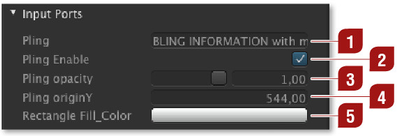


All published input ports of a real-time graphics item can be changed while it is on air.
, multiple selections available,
Related content
4.16 Inspector: Graphic Specific Attributes
4.16 Inspector: Graphic Specific Attributes
More like this
4.15 Inspector: RT Graphic Specific Attributes (v2.0)
4.15 Inspector: RT Graphic Specific Attributes (v2.0)
More like this
5.9 Inspector (v2.0)
5.9 Inspector (v2.0)
More like this
5.6 Inspector (v.4.x)
5.6 Inspector (v.4.x)
More like this
5.6 Inspector (v.5.x)
5.6 Inspector (v.5.x)
More like this
4.4 Inspector (v3.0)
4.4 Inspector (v3.0)
More like this